
xen
> infosec wannabe
> tinkerer
> privacy nut
"understanding is a three-edged sword"
Chasing ghosts - Dissecting a Librem 14
Backstory
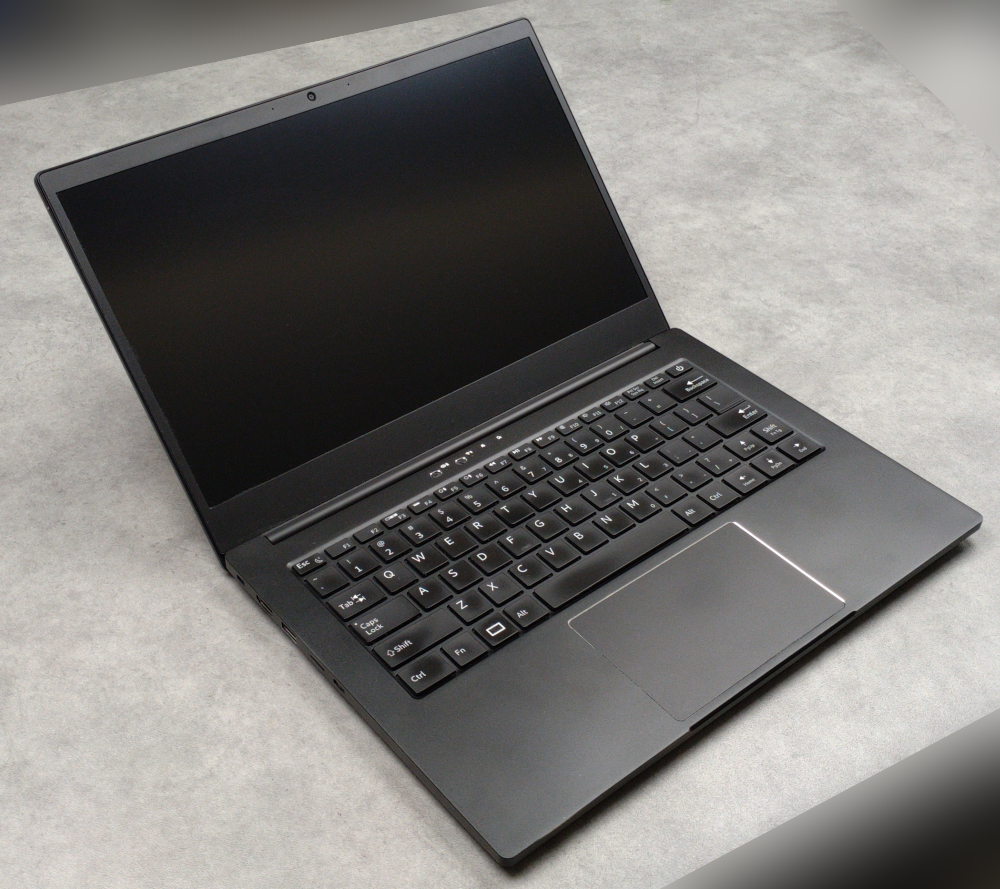
A few years back, an acquaintance of mine asked if I could take a look at a freshly delivered Librem 14, which was showing an error right at its first boot. According to the fancy looking BIOS message, at least one hash it checks at boot did not match. Not a good omen for a machine specifically built and sold for privacy nuts.
This product line (the Librem notebook series) has - among other neat features - a unique secure boot implementation (Pureboot). Since the anti-inerdiction service (offered by Purism for these laptops) was not used for the shipping procedure, there was a lingering suspicion that the machine may have gotten an implant somewhere during transit. My task was to search for any indication of compromise. The client - understandably so - did not want the machine back.
The OS itself was of less importance, since the client has already reinstalled PureOS by the time i got the package. The real question was how secure is the underlying machine it had been installed on.
Examining the hardware
If there is in fact some persistent implant laying dormant in the BIOS/PCH or the EC, it would not be the greatest idea to power on the machine before I know exactly what is there to deal with. Self-deletion is always a concern, so my initial angle was to do everything I can offline.
By looking at the chassis, it is clear that accessing the internals can only be done by removing the bottom panel held by 9 M2.4 screws.
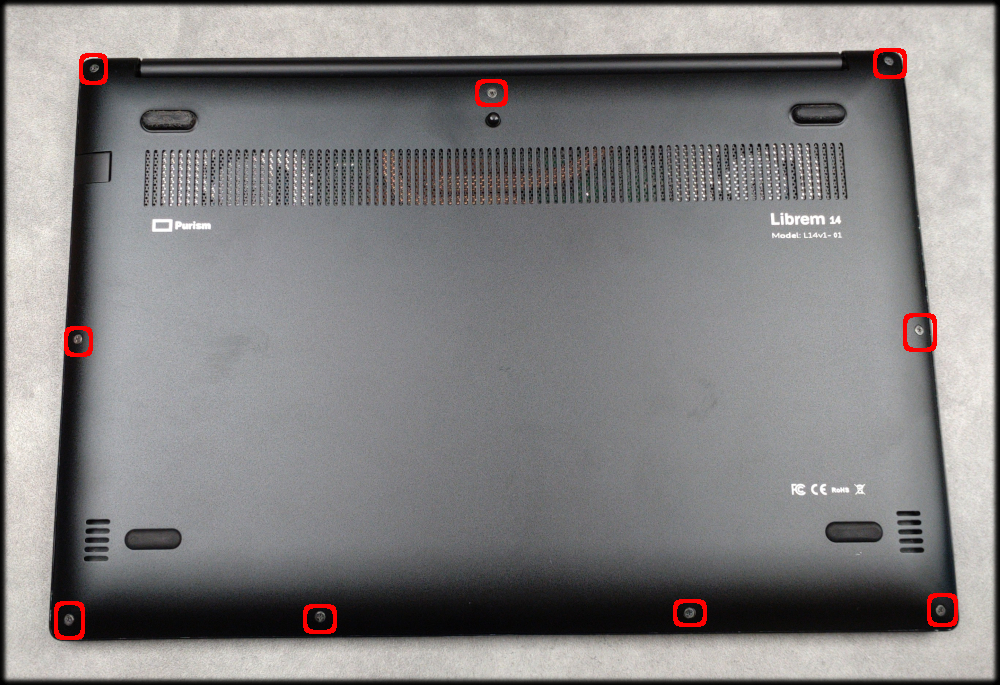
Figure 1. Chassis with bottom plate screws
No tamper-evident sealing (tapes, stickers, glue). The keyboard is replaced from the bottom as well. The plate screws had some visible wear, which (along with the broken sealing glue (grainy blue-ish markings on the thread) suggested the machine was opened after the initial assembly. Of course at this point nothing certain can be said, so I took a peek at the mainboard.
Visible manual soldering has clearly been done here, but after I sent the pictures to an EE friend actively doing board development. I was assured that this is probably just some rework done after a failed QA run and it happens more times than any assembly plant wants to admit. Everything else seemed to be in order.
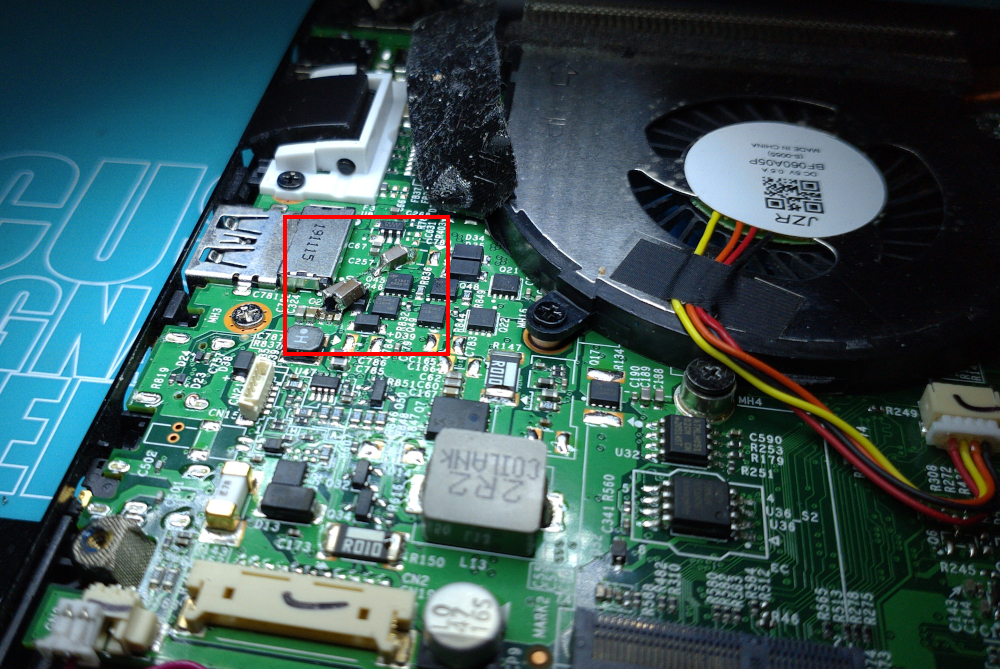
Figure 2. Traces of manual rework
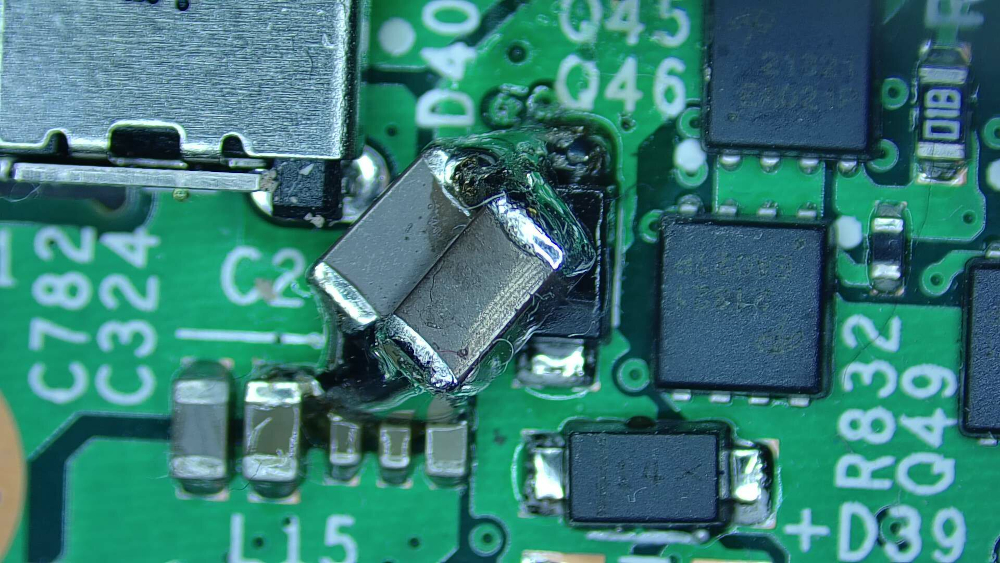
Figure 3. Traces of manual rework
Let’s go deeper.
Extracting the firmware
Purism did a great job of keeping thigs open. They have extensive documentation of how they put things together and how you can take it apart (at least on a user level).
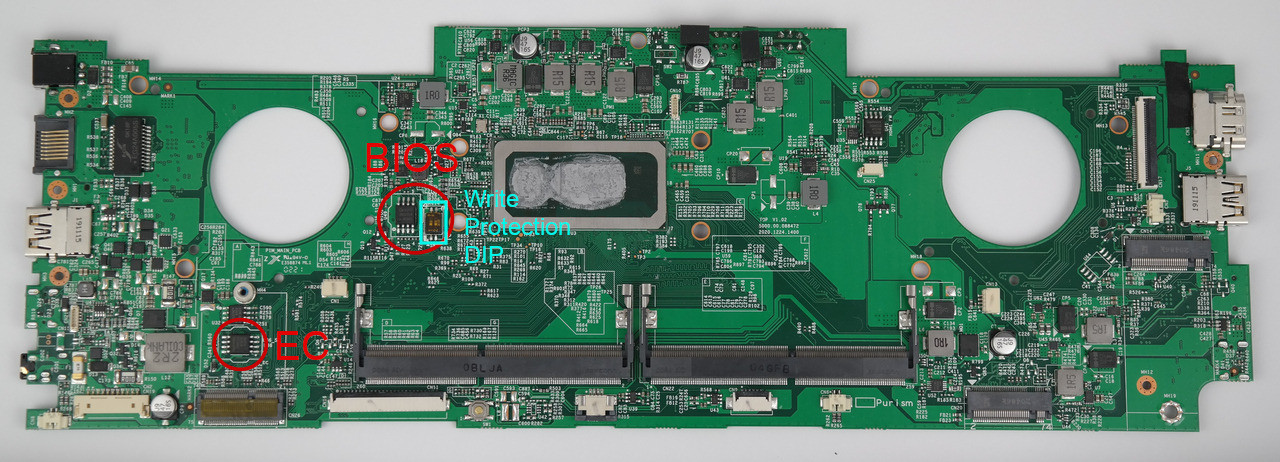
Figure 4. Librem 14 mainboard top view
The main board has 2 flash chips which were of interest to me.
The EC flash is located south from the right vent hole.
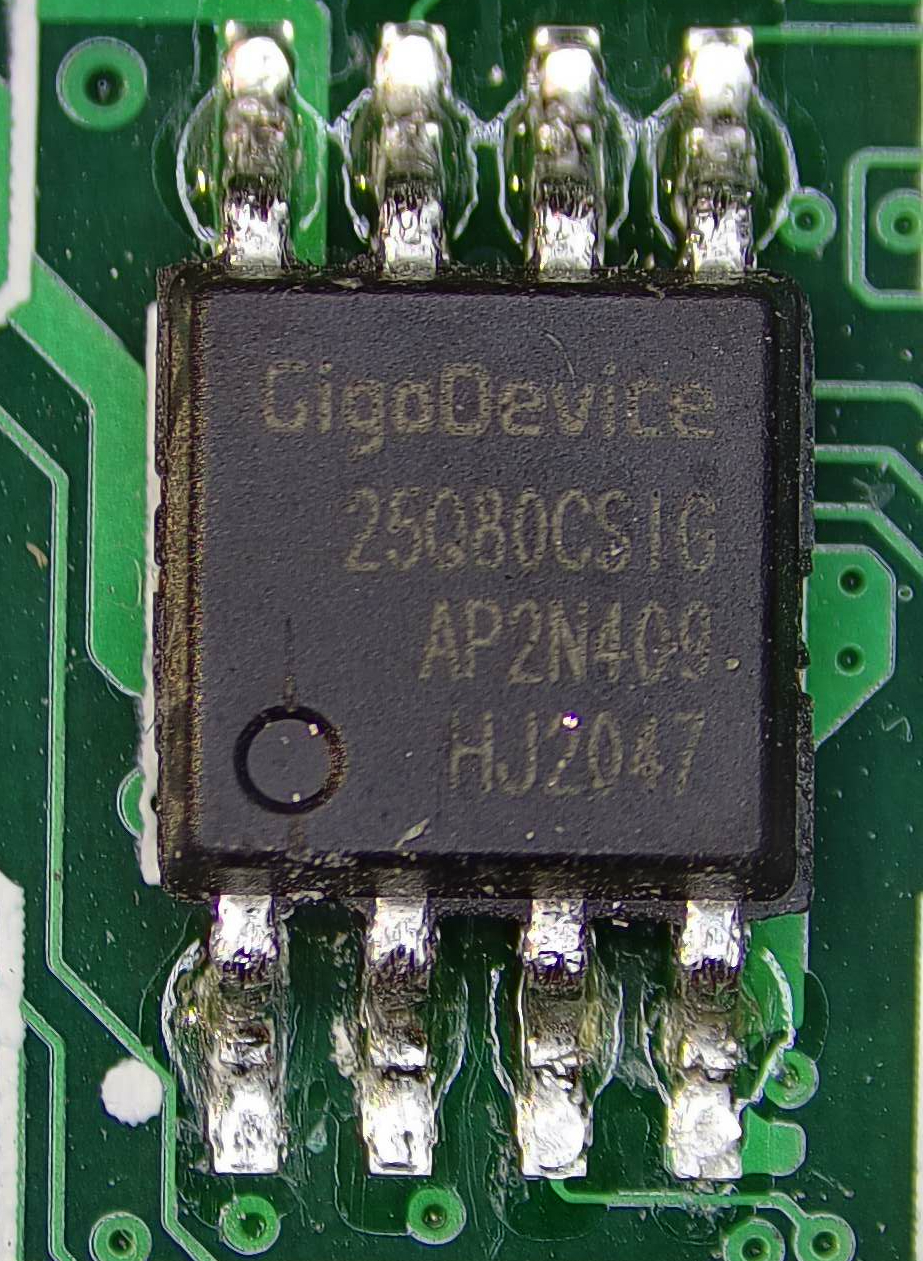
Figure 5. EC flash chip
The BIOS chip is between the vent hole and the CPU at the bottom of the main board.
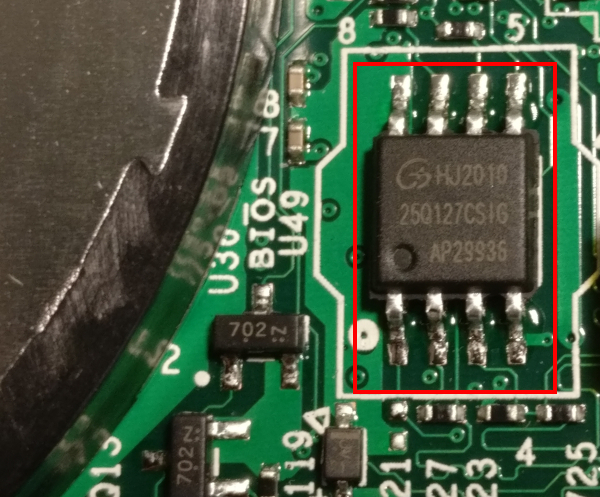
Figure 6. BIOS flash chip
It is fairly easy to find them, since there are only 3 SOIC 8 chips on the whole board altogether. The third chip contains the HDMI firmware, which I pulled later anyway, because it let me…
Purism has its own guide for upgrading the firmware the hard way. Based on that, extracting the firmware was straightforward enough.
| Since all three flash chips on the board can tolerate 5V, the broken-by-design CH341A chinesium flash programmer from ebay did the job wonderfully. But you really should operate on 3.3V by fixing the damn thing. |
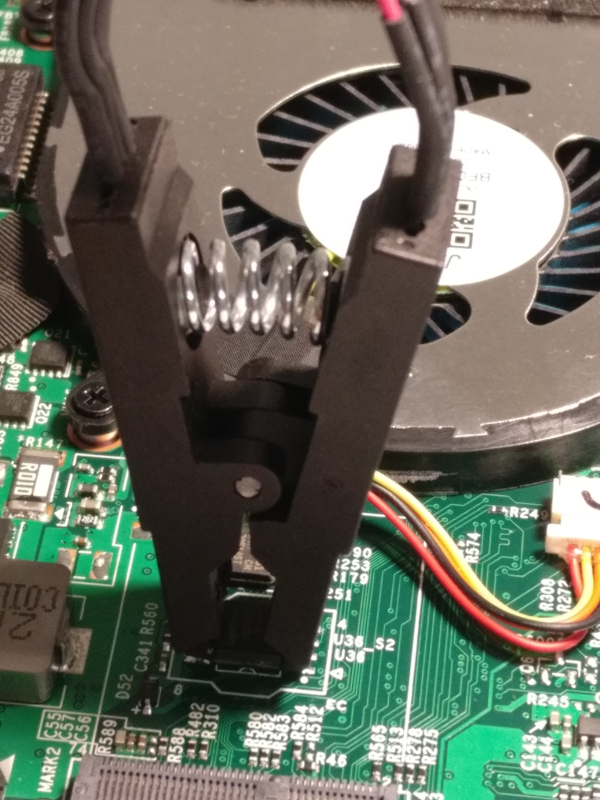
Figure 7. Connecting CH341A to the EC flash chip
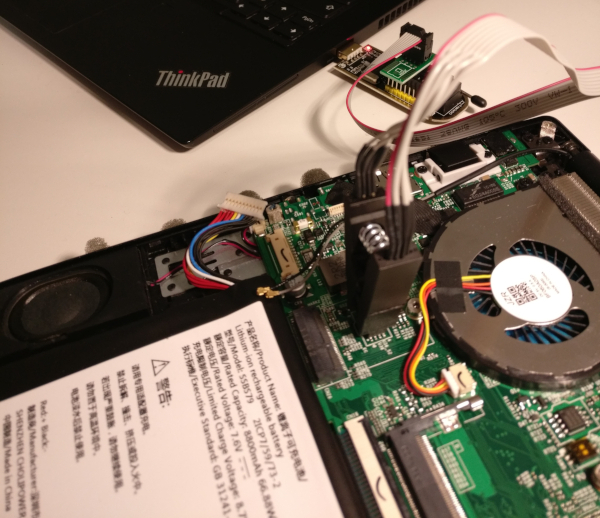
Figure 8. Connecting CH341A to the EC flash chip
Using flashrom, both the EC and the BIOS was downloaded into binary files.
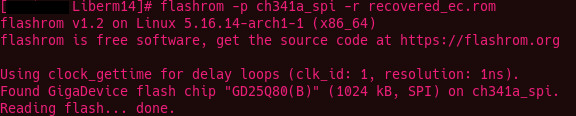
Figure 9. Reading the EC flash with flashrom
Taking a stroll in firmwareland
Both the EC and the BIOS variants (Coreboot and Pureboot) are Open Source software. A wonderful thing for reversing. Since I have each of the ROMs extracted to a file now, the analysis can finally begin.
The extracted EC ROM is 4MB, the BIOS ROM is a 16MB binary. Not being an expert at firmware image analysis of any sort, doing comparation with the original builds seemed most logical. Sifting through the differences might make things a tad easier, but for comparation, the original images are needed. Each and every version. Luckily, both the BIOS source and the official binary releases are uploaded to Purism’s git server.
After a few tries, it was obvious that the toolchain for building Pureboot doesn’t work well on Arch, so I’ve made a dedicated VM for building Purism stuff. But what OS would be ideal? Let’s try PureOS in a VM. I’ve never booted that one up yet, why not give it a try and build all of its own stuff with it. Well, it turns out that PureOS is not supported by the librem EC firmware build scripts.
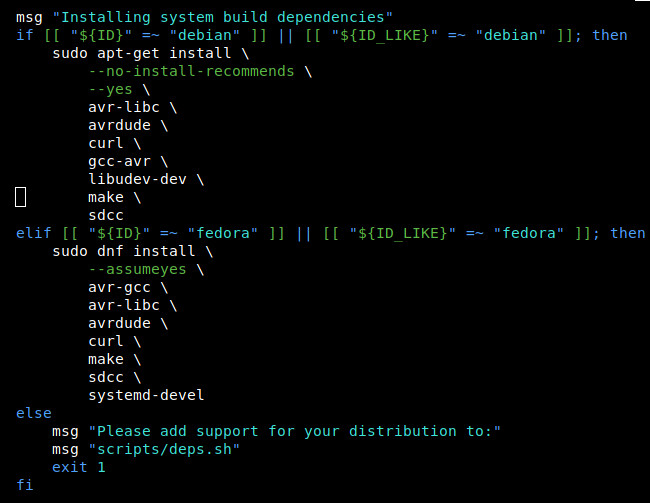
Figure 10. Linux distributions supported by the EC build scripts
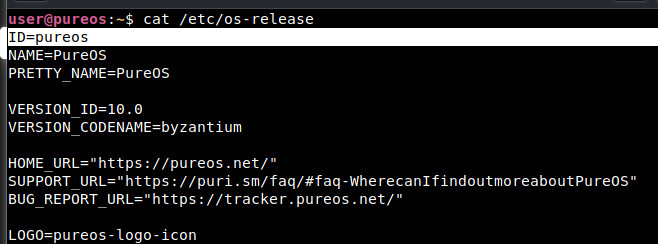
Figure 11. /etc/os-release on PureOS
This is probably with reason so let’s use plain Debian then. After setting up the Debian build VM, the process itself went smoothly. The setup scripts ran and set up the toolchain as needed. I had to slap together a small bash script to automate the build process for every commit there is in the repos. This script successfully built and collected all the EC binaries for every version for all the available states in the repo (git commits), all the way back to the very first public one.
I did the same for Pureboot.
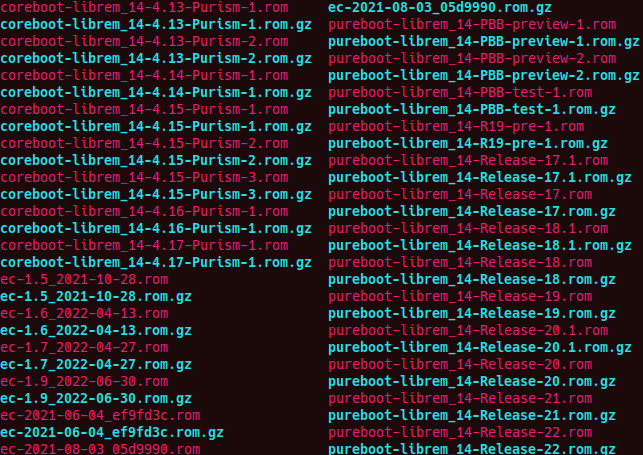
Figure 12. Built BIOS and EC images
Aside from my own extra-mile running, all the "official" binaries for numbered releases (way less than the built ones) were downloaded for analysis as well.
Working the EC
From the official purism site:
1
2
3
The EC in a laptop handles a range of functions which the main CPU does not, including (but not limited to): powering on the device, charging the battery, thermal management / fan control, lid state, LEDs and switches, and the keyboard. In many ways, it’s as important, if not more important, to have control over the EC firmware as the main system firmware (coreboot/PureBoot, in our case).

As with the system firmware, the EC firmware is tailored precisely for the board/device on which it runs.
EC Comparation
Since the EC only deserves attention if it has been modified, run the comparation script against all extracted official builds.
1
2
3
4
5
6
7
8
➜  02_bios_comparation ./firmware_comparator.sh -c ../EC/02_compare_ec/recovered_ec.rom
[.] Running in mode: compare
[.] Extraction directory: /home/xen/projects/Librem14_WIP/02_bios_comparation/extracted_images.
[.] Original ROM path: ../EC/02_compare_ec/recovered_ec.rom
[.] Comparing images against ROM dump file: ../EC/02_compare_ec/recovered_ec.rom
[.] Searching for identical files...
[.] Comparing against ./extracted_images//ec-1.5_2021-10-28.rom
[+] MATCH FOUND: ./extracted_images//ec-1.5_2021-10-28.rom
Hashing with SHA512 confirms this.
1
2
16968d0502db4f4277f689274a07469ddd0ca6eb29488d4735e50d2a2157ffb85d3fa1abbb69ec26e7dc4296ae7b432373d1425421c3fdb77b0e4e9c1ced50f2  ec-1.5_2021-10-28.rom
16968d0502db4f4277f689274a07469ddd0ca6eb29488d4735e50d2a2157ffb85d3fa1abbb69ec26e7dc4296ae7b432373d1425421c3fdb77b0e4e9c1ced50f2  recovered_ec.rom
ec-1.5_2021-10-28.rom matches to the extracted EC ROM, so the EC has not been modified.
Pureboot
Running strings on the BIOS rom resulted in a few discoveries, but none as important as the version and build information of the image (presuming it is correct).
1
grep -e Pure recovered_bios_strings.txt
1
2
3
4
5
-PureBoot-Release-19
CONFIG_LOCALVERSION="PureBoot-Release-19"
#define COREBOOT_EXTRA_VERSION "-PureBoot-Release-19"
-PureBoot-Release-19
-PureBoot-Release-19
According to the ROM binary, the version is PureBoot-Release-19.
BIOS Comparation
Version information is a cool thing, if you have the luxury of beliving the source printing it. In this case, I’m a bit reserved, so gave that diffscript a try.
 1
 2
 3
 4
 5
 6
 7
 8
 9
10
11
12
13
14
15
16
17
18
19
20
21
22
23
24
25
26
27
28
➜  02_bios_comparation ./firmware_comparator.sh -c ../BIOS/recovered_bios.rom
[.] Running in mode: compare
[.] Extraction directory: /home/xen/projects/Librem14_WIP/02_bios_comparation/extracted_images.
[.] Original ROM path: ../BIOS/recovered_bios.rom
[.] Comparing images against ROM dump file: ../BIOS/recovered_bios.rom
[.] Searching for identical files...
[.] Comparing against ./extracted_images//coreboot-librem_14-4.13-Purism-1.rom
[.] Comparing against ./extracted_images//coreboot-librem_14-4.13-Purism-2.rom
[.] Comparing against ./extracted_images//coreboot-librem_14-4.14-Purism-1.rom
[.] Comparing against ./extracted_images//coreboot-librem_14-4.15-Purism-1.rom
[.] Comparing against ./extracted_images//coreboot-librem_14-4.15-Purism-2.rom
[.] Comparing against ./extracted_images//coreboot-librem_14-4.15-Purism-3.rom
[.] Comparing against ./extracted_images//coreboot-librem_14-4.16-Purism-1.rom
[.] Comparing against ./extracted_images//coreboot-librem_14-4.17-Purism-1.rom
[.] Comparing against ./extracted_images//pureboot-librem_14-PBB-preview-1.rom
[.] Comparing against ./extracted_images//pureboot-librem_14-PBB-preview-2.rom
[.] Comparing against ./extracted_images//pureboot-librem_14-PBB-test-1.rom
[.] Comparing against ./extracted_images//pureboot-librem_14-R19-pre-1.rom
[.] Comparing against ./extracted_images//pureboot-librem_14-Release-17.1.rom
[.] Comparing against ./extracted_images//pureboot-librem_14-Release-17.rom
[.] Comparing against ./extracted_images//pureboot-librem_14-Release-18.1.rom
[.] Comparing against ./extracted_images//pureboot-librem_14-Release-18.rom
[.] Comparing against ./extracted_images//pureboot-librem_14-Release-19.rom
[.] Comparing against ./extracted_images//pureboot-librem_14-Release-20.1.rom
[.] Comparing against ./extracted_images//pureboot-librem_14-Release-20.rom
[.] Comparing against ./extracted_images//pureboot-librem_14-Release-21.rom
[.] Comparing against ./extracted_images//pureboot-librem_14-Release-22.rom
[.] Comparing complete.
Sad. but it is to be expected, since the BIOS ROM may contain everything from settings/signatures/etc.
Time for a more ganular approach. Since comparation to find full matches has not been successful, it is time to look for partial matches. Whipped up a python script that does partial byte-by-byte comparsion and computes difference. Running this over the extracted ROMs, one has significantly differing bytes than the others.
 1
 2
 3
 4
 5
 6
 7
 8
 9
10
11
12
13
14
15
16
17
18
19
20
21
22
23
24
25
26
27
28
29
30
31
32
33
34
35
36
37
38
39
40
41
42
[.] Difference in bytes:
[.] Comparing against ./extracted_images//pureboot-librem_14-PBB-preview-1.rom

[.] Difference in bytes: 8881789
[.] Comparing against ./extracted_images//pureboot-librem_14-PBB-preview-2.rom

[.] Difference in bytes: 8881643
[.] Comparing against ./extracted_images//pureboot-librem_14-PBB-test-1.rom

[.] Difference in bytes: 11834730
[.] Comparing against ./extracted_images//pureboot-librem_14-R19-pre-1.rom

[.] Difference in bytes: 8321113
[.] Comparing against ./extracted_images//pureboot-librem_14-Release-17.1.rom

[.] Difference in bytes: 8724064
[.] Comparing against ./extracted_images//pureboot-librem_14-Release-17.rom

[.] Difference in bytes: 8722686
[.] Comparing against ./extracted_images//pureboot-librem_14-Release-18.1.rom

[.] Difference in bytes: 3855656
[.] Comparing against ./extracted_images//pureboot-librem_14-Release-18.rom

[.] Difference in bytes: 8722367
[.] Comparing against ./extracted_images//pureboot-librem_14-Release-19.rom

[.] Difference in bytes: 11499
[.] Comparing against ./extracted_images//pureboot-librem_14-Release-20.1.rom

[.] Difference in bytes: 8813578
[.] Comparing against ./extracted_images//pureboot-librem_14-Release-20.rom

[.] Difference in bytes: 8655684
[.] Comparing against ./extracted_images//pureboot-librem_14-Release-21.rom

[.] Difference in bytes: 8824012
[.] Comparing against ./extracted_images//pureboot-librem_14-Release-22.rom

[.] Difference in bytes: 8893095
[.] Comparing complete.
[.] Smallest difference: 11499 bytes with file: ./extracted_images//pureboot-librem_14-Release-19.rom
The absolute winner is pureboot-librem_14-Release-19.rom. Only 12k bytes differ, which indicates that the code might be the same, but some sections may be altered after deployment / during operation, or, there is the malware I’m looking for.
Let’s see how this image looks with binwalk.
 1
 2
 3
 4
 5
 6
 7
 8
 9
10
recovered_bios.rom
---------------------------------------------------------------------------------------------------------------------
DECIMAL                            HEXADECIMAL                        DESCRIPTION
---------------------------------------------------------------------------------------------------------------------
7451808                            0x71B4A0                           SHA256 hash constants, little endian
8724004                            0x851E24                           SHA256 hash constants, little endian
8734035                            0x854553                           XZ compressed data, total size: 3543164 bytes
12300142                           0xBBAF6E                           XZ compressed data, total size: 3993492 bytes
16766880                           0xFFD7A0                           SHA256 hash constants, little endian
---------------------------------------------------------------------------------------------------------------------
Not much to work with, but at least the XZ compressed segments can be extacted.
1
2
3
4
--------------------------------------------------------------------
[+] Extraction of xz data at offset 0x854553 completed successfully
[+] Extraction of xz data at offset 0xBBAF6E completed successfully
--------------------------------------------------------------------
0x854553: ELF 64-bit LSB executable, x86-64, version 1 (SYSV), statically linked, BuildID[sha1]=ddc39eca1a71f9536293cbe1718dc3aa31e0d774, stripped
0xBBAF6E: ASCII cpio archive (SVR4 with no CRC)
0x854553 is probably the executed BIOS code and 0xBBAF6E is the file system in CPIO format mounted under it during runtime.
According to firmware_sources/pureboot/config/coreboot-librem_14.config the ELF and the cpio image would be
1
2
CONFIG_PAYLOAD_FILE="../../build/librem_14/bzImage"
CONFIG_LINUX_INITRD="../../build/librem_14/initrd.cpio.xz"
Comparing pureboot-librem_14-Release-19.rom against the recovered_bios.rom manually reveals that none of the two segments above differ.
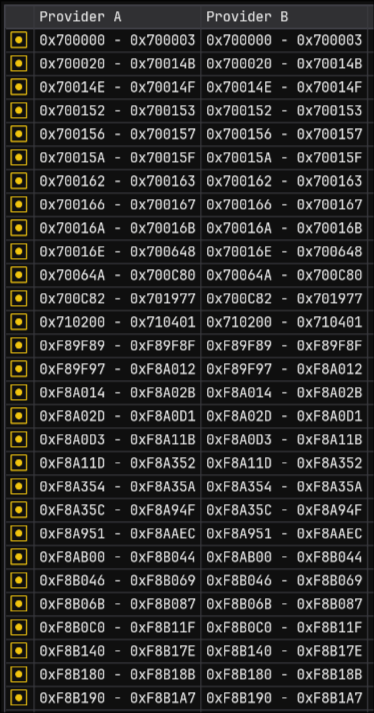
Figure 13. ImHex differing sections between stock and recovered BIOS images
I did a fast entropy analysis on the candidate which resulted in a minor (0.00053) difference.

Figure 14. Entropy comparsion
Stemming from the low count of differring bytes, there is no visible difference in byte-distribution graph.
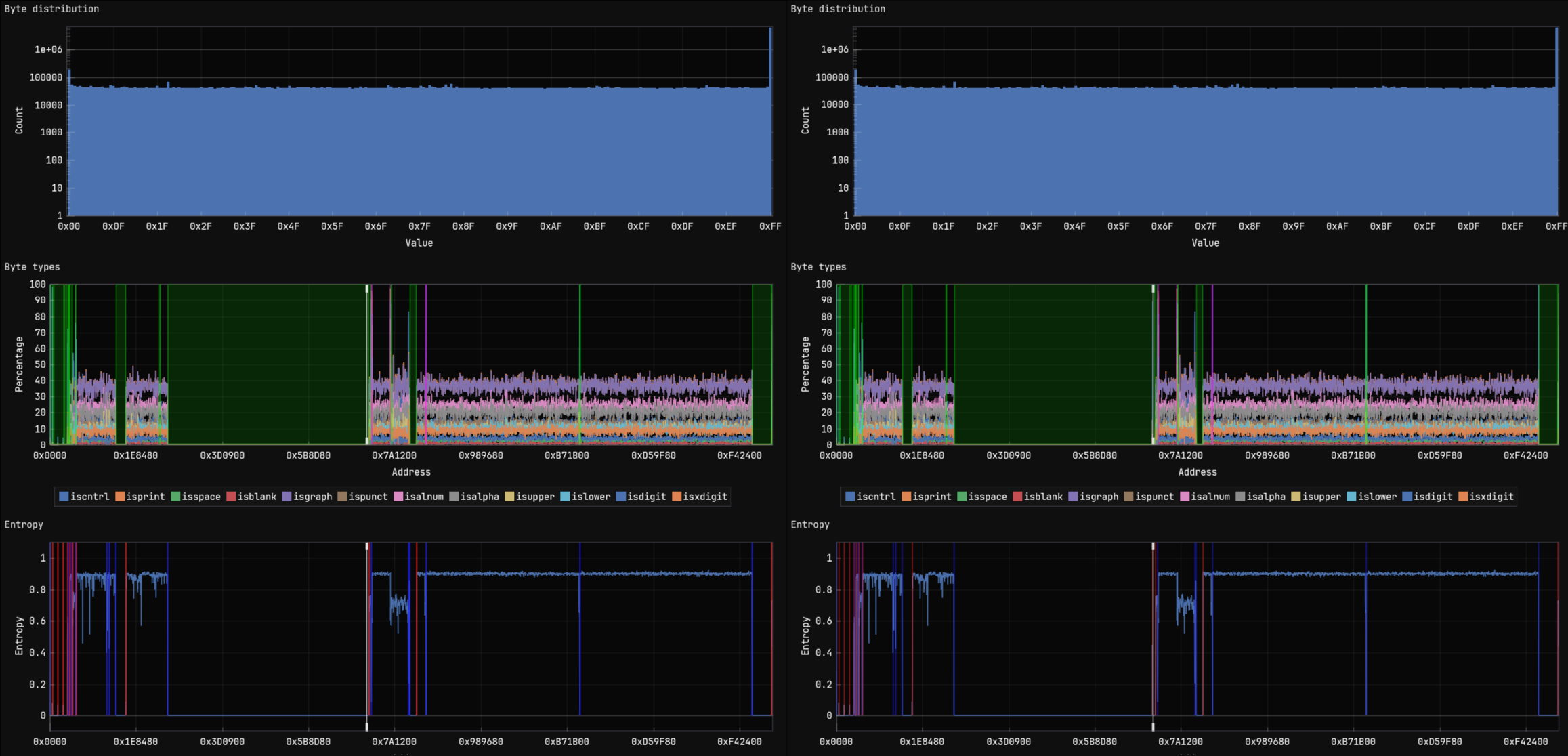
Figure 15. Visualized byte distribution, type and entropy differences
It’s time to give the differing regions a closer look.
CBFS contents of pureboot-librem_14-Release-19.rom:
Name |
Offset |
Type |
Metadata Size |
Data Size |
Total Size |
cbfs master header |
0x0 |
cbfs header |
0x2c |
0x20 |
0x4c |
fallback/romstage |
0x80 |
stage |
0x80 |
0x109d8 |
0x10a58 |
cpu_microcode_blob.bin |
0x10b00 |
microcode |
0x30 |
0x4a000 |
0x4a030 |
intel_fit |
0x5ab40 |
raw |
0x30 |
0x50 |
0x80 |
fallback/ramstage |
0x5abc0 |
stage |
0x54 |
0x1e1b2 |
0x1e206 |
config |
0x78e00 |
raw |
0x20 |
0x328 |
0x348 |
revision |
0x79180 |
raw |
0x24 |
0x2ce |
0x2f2 |
build_info |
0x79480 |
raw |
0x24 |
0x61 |
0x85 |
fallback/dsdt.aml |
0x79540 |
raw |
0x2c |
0x38cd |
0x38f9 |
vbt.bin |
0x7ce40 |
raw |
0x30 |
0x49e |
0x4ce |
(empty) |
0x7d340 |
null |
0x1c |
0xa64 |
0xa80 |
fspm.bin |
0x7ddc0 |
fsp |
0x40 |
0x8e000 |
0x8e040 |
(empty) |
0x10be00 |
null |
0x1c |
0xfa4 |
0xfc0 |
fsps.bin |
0x10cdc0 |
fsp |
0x40 |
0x2e85f |
0x2e89f |
fallback/postcar |
0x13b680 |
stage |
0x44 |
0x685c |
0x68a0 |
fallback/payload |
0x141f40 |
simple elf |
0x2c |
0x736e02 |
0x736e2e |
(empty) |
0x878d80 |
null |
0x1c |
0x6f2e4 |
0x6f300 |
bootblock |
0x8e8080 |
bootblock |
0x40 |
0x6d40 |
0x6d80 |
1
2
3
4
5
6
7
cbfstool ./recovered_bios.rom layout -w

'BIOS' (read-only, size 9437184, offset 7340032)
'RW_MRC_CACHE' (size 65536, offset 7340032)
'RW_SPD_CACHE' (size 4096, offset 7405568)
'FMAP' (read-only, size 512, offset 7409664)
'COREBOOT' (CBFS, size 9367040, offset 7410176)
A more detailed view at the 'COREBOOT' region of the image shows the following (offset is from the CBFS base address: 0x711200); CBFS contents of recovered_bios.rom:
Name |
Offset |
Type |
Metadata Size |
Data Size |
Total Size |
cbfs master header |
0x0 |
cbfs header |
0x2c |
0x20 |
0x4c |
fallback/romstage |
0x80 |
stage |
0x80 |
0x109d8 |
0x10a58 |
cpu_microcode_blob.bin |
0x10b00 |
microcode |
0x30 |
0x4a000 |
0x4a030 |
intel_fit |
0x5ab40 |
raw |
0x30 |
0x50 |
0x80 |
fallback/ramstage |
0x5abc0 |
stage |
0x54 |
0x1e1b2 |
0x1e206 |
config |
0x78e00 |
raw |
0x20 |
0x328 |
0x348 |
revision |
0x79180 |
raw |
0x24 |
0x2ce |
0x2f2 |
build_info |
0x79480 |
raw |
0x24 |
0x61 |
0x85 |
fallback/dsdt.aml |
0x79540 |
raw |
0x2c |
0x38cd |
0x38f9 |
vbt.bin |
0x7ce40 |
raw |
0x30 |
0x49e |
0x4ce |
(empty) |
0x7d340 |
null |
0x1c |
0xa64 |
0xa80 |
fspm.bin |
0x7ddc0 |
fsp |
0x40 |
0x8e000 |
0x8e040 |
(empty) |
0x10be00 |
null |
0x1c |
0xfa4 |
0xfc0 |
fsps.bin |
0x10cdc0 |
fsp |
0x40 |
0x2e85f |
0x2e89f |
fallback/postcar |
0x13b680 |
stage |
0x44 |
0x685c |
0x68a0 |
fallback/payload |
0x141f40 |
simple elf |
0x2c |
0x736e02 |
0x736e2e |
heads/initrd/.gnupg/pubring.kbx |
0x878d80 |
raw |
0x38 |
0xb35 |
0xb6d |
heads/initrd/.gnupg/trustdb.gpg |
0x879900 |
raw |
0x38 |
0x550 |
0x588 |
heads/initrd/etc/config.user |
0x879ec0 |
raw |
0x38 |
0x28 |
0x60 |
serial_number |
0x879f40 |
raw |
0x28 |
0x17 |
0x3f |
(empty) |
0x879f80 |
null |
0x28 |
0x6e0d8 |
0x6e100 |
bootblock |
0x8e8080 |
bootblock |
0x40 |
0x6d40 |
0x6d80 |
The RW_MRC_CACHE starts at 0x700000, RW_SPD_CACHE at 0x710000, which corresponds with the differring segments offsets previously found.

Figure 16. Memory Reference Code cache

Figure 17. Serial Presence Detect cache
From 0x7000000 to 0x710401 the differences are in the two cache regions, which is completely normal.
I’ve mapped all differring sections to the layout cbfstool exported.
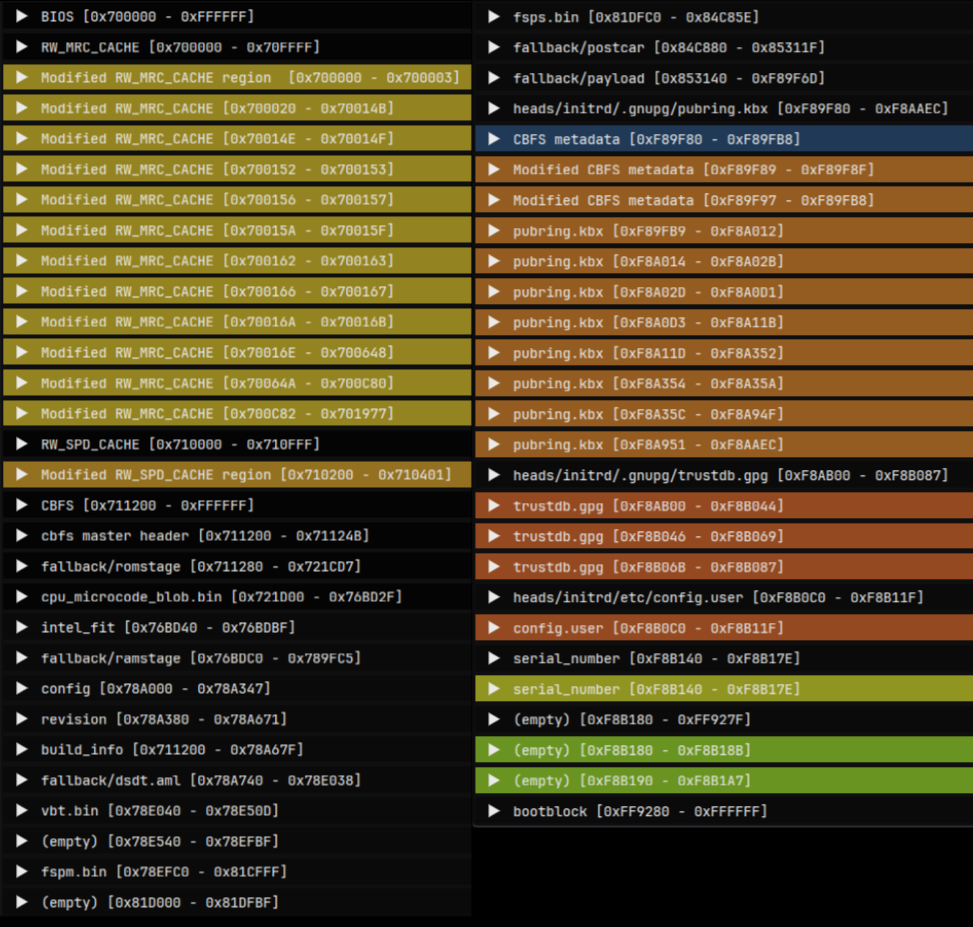
Figure 18. Differing sections mapped to image layout
Extracted the 4 new regions in CBFS into file:
 1
 2
 3
 4
 5
 6
 7
 8
 9
10
11
cbfstool ./recovered_bios.rom extract -n heads/initrd/.gnupg/pubring.kbx -f pubring.kbx
Found file heads/initrd/.gnupg/pubring.kb at 0x878d80, type raw, compressed 2869, size 2869

cbfstool ./recovered_bios.rom extract -n heads/initrd/.gnupg/trustdb.gpg -f extracted/trustdb.gpg
Found file heads/initrd/.gnupg/trustdb.gp at 0x879900, type raw, compressed 1360, size 1360

cbfstool ./recovered_bios.rom extract -n heads/initrd/etc/config.user -f extracted/config.user
Found file heads/initrd/etc/config.user at 0x879ec0, type raw, compressed 40, size 40

cbfstool ./recovered_bios.rom extract -n serial_number -f extracted/serial_number
Found file serial_number at 0x879f40, type raw, compressed 23, size 23
Contents of config.user:
1
export CONFIG_BOOT_DEV="/dev/nvme0n1p1"
Which is the boot device set in the BIOS.
Contents of serial_number:
1
P1MBKPUR03-2101 [ REDACTED ] 222%
is serial the number of the machine, also printed on the sticker whichi removed prior to taking photos.
1
2
3
pubring.kbx: GPG keybox database version 1, created-at Fri Apr 16 01:18:12 2021, last-maintained Fri Apr 16 01:18:12 2021

trustdb.gpg: GPG key trust database version 3
pubring.kbx contains the following:
1
2
3
4
5
6
7
8
gpg --list-keys
/home/user/.gnupg/pubring.kbx
-----------------------------
pub   rsa3072 2021-04-16 [SC]
      997BB88E3B456EE96C9DADD834A61DACE79472C4
uid           [ultimate] OEM Key (OEM-generated key) <oem-20210416011731@example.com>
sub   rsa3072 2021-04-16 [A]
sub   rsa3072 2021-04-16 [E]
 1
 2
 3
 4
 5
 6
 7
 8
 9
10
11
12
13
14
15
16
17
18
19
20
21
22
23
24
25
26
27
28
29
30
31
32
33
34
35
36
37
38
39
40
41
42
43
44
45
46
47
48
49
50
kbxutil pubring.kbx
BEGIN-RECORD: 0
Length: 32
Type:   Header
Version: 1
Flags:   0002 (openpgp)
created-at: 1618535892
last-maint: 1618535892
END-RECORD
BEGIN-RECORD: 1
Length: 2837
Type:   OpenPGP
Version: 1
Blob-Flags: 0000
Data-Offset: 158
Data-Length: 2659
Unhashed: 20
Key-Count: 3
Key-Info-Length: 28
Key-Fpr[0]: 997BB88E3B456EE96C9DADD834A61DACE79472C4
Key-Kid-Off[0]: 32
Key-Kid[0]: 34A61DACE79472C4
Key-Flags[0]: 0000
Key-Fpr[1]: BE5787CF4B0861AC1F55ABFFCEEFCC91EE101F8E
Key-Kid-Off[1]: 60
Key-Kid[1]: CEEFCC91EE101F8E
Key-Flags[1]: 0000
Key-Fpr[2]: D6E6C379C3189EE9FF8A3E800D0B23D492FB1168
Key-Kid-Off[2]: 88
Key-Kid[2]: 0D0B23D492FB1168
Key-Flags[2]: 0000
Serial-No: none
Uid-Count: 1
Uid-Info-Length: 12
Uid-Off[0]: 574
Uid-Len[0]: 60
Uid[0]: "OEM Key (OEM-generated key) <oem-20210416011731@example.com>"
Uid-Flags[0]: 0000
Uid-Validity[0]: 0
Sig-Count: 3
Sig-Info-Length: 4
Sig-Expire[0-2]: [not checked]
Ownertrust: 0
All-Validity: 0
Recheck-After: 0
Latest-Timestamp: 0
Created-At: 1618536127
Reserved-Space: 0
Checksum: e65ba8baee9c9860d520af267020149d4366e706 [valid]
END-RECORD
1
2
3
4
gpg --export-ownertrust > ownertrust.txt && cat ownertrust.txt
997BB88E3B456EE96C9DADD834A61DACE79472C4:6:
BE5787CF4B0861AC1F55ABFFCEEFCC91EE101F8E:6:
D6E6C379C3189EE9FF8A3E800D0B23D492FB1168:6:
Whick are valid GPG trustdb and keyring files, most likely created and populated during manufacturing / first setup of Pureboot.
Conclusion
Nothing of relevance was found, which was a bit dissapointing, but oh well, I got to look around in a unique piece of hardware.
Afterword
After the analysis was done, the time had come to take the machine out for a spin, as it is more than capable to be a daily driver. I’ve thrown out the wifi card and replaced it with a newer intel model. The factory SSD had met a similar fate. A new EC version is a must have due to the numerous issues present in Purism’s bug tracker. At the time of doing this, EC v1.9 was the newest, so I flashed it with flashrom without issue.
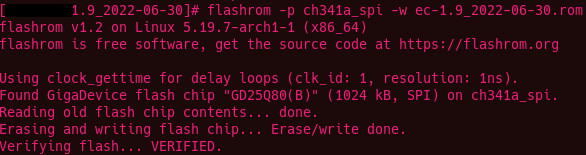
Figure 19. Writing the newly built EC to the flash with flashrom
Same for the BIOS. Since I did not want to use PureOS, Pureboot would have no benefits. Coreboot was a better, simpler option, so I built the newest version in the dedicated VM and flashed it using the same flashrom method to the BIOS chip.
This was never intended to be, and still is not a "product review" in any form, but after tinkering with the machine for a considerably long while, I just couldn’t help but notice a few things: It certainly has some minor design flaws (mediocre keyboard, ridiculous coil whine and random power cuts under load), the L14 is not a badly designed machine. It’s just not ready yet.
After 1 year of daily-driving, the battery died. Completely. It was however, not a sudden death. There were signs, I just wasn’t paying enough attention at the time. The coil whine was getting worse for the last few weeks. It got to the point where I had to shut it down for the night. The random poweroffs under load or while connecting chargers were a thing from the first week, but they were getting more and more frequent. I misattributed that to the WIP EC ROM. Well I guess I was wrong on that one. On its last days, it wouldn’t even reach POST without a charger, just gave a flash on the status LED and died instantly.
Out of sheer curiosity I partly disassembled the battery pack to check the insides.
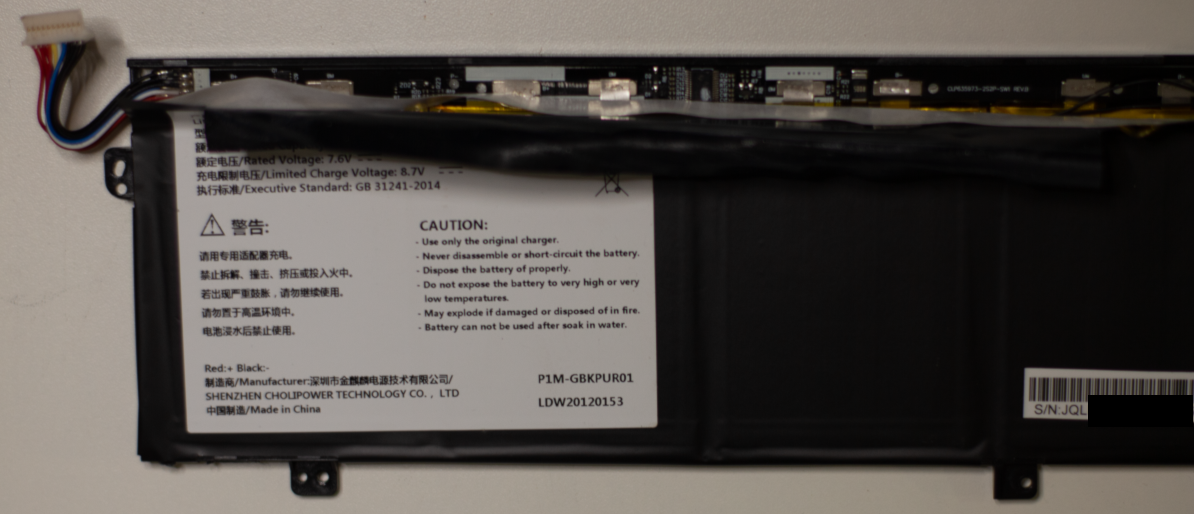
Figure 20. Battey pack electronics without cover
Measuring the cell voltages resulted in deep sadness.
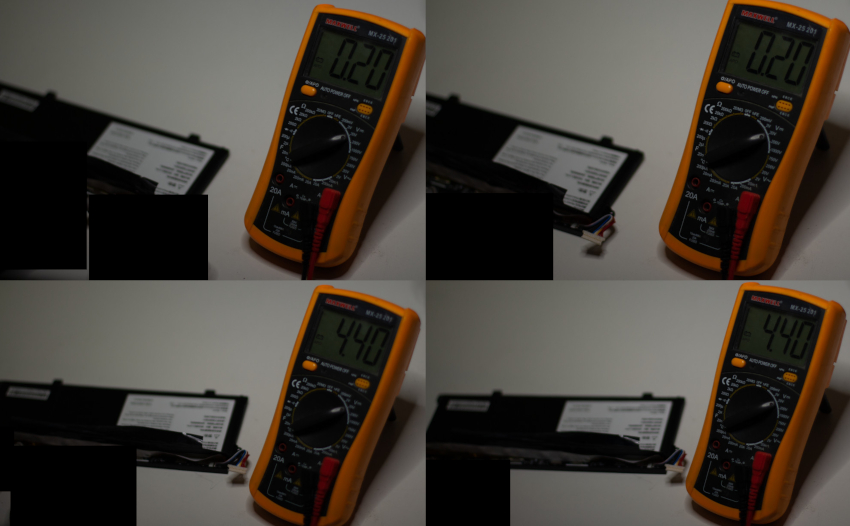
Figure 21. Battery cell voltages
2 of the 4 cells are dead. Naturally, I’ve tried ordering a new 4-cell battery from the official store: No shipping options available for my country ;). This did not surprise me, however, I’ve found and contacted the battery manufacturer (a chinese company which makes batteries for a whole lot of clients other than Purism), but this model was no longer in production, nor the cells within, so that’s that. I’m a big fan of hacky solutions, but not on the machine I use daily, so this is the sad end for this box.